

My 486 PC restoration
During 2025 I’ve put my electronics skills back on the workbench.
During 2024 I’ve started restoring my PCs. One I’ve been particularly intrigued is the 486 PC I’ve got, which kind of surprised me. This one is not the one I’ve been using as a kid, which is long gone, but rather a salvaged PC who my father brought back home from the company he was working with during the 90s, after to some computer refresh.
The HDD suffered of sudden death in ~2023, and I let it stay in the basement ever since I would have had the time and will to restore it. Which happened in 2024.
The journey
After luckily finding a “new” 1.6GiB HDD – a splendid ATA33 device with just 1 dead cluster – I discovered so many retro sites who guided me through on the exact specifications of my (so far mostly unknown) piece of hardware.
I discovered the mobo [0] also featured Vesa Local Bus (VLB) slots – which was a mid way in between ISA and PCI, a kind of market flop due to the accelerated rise of Intel Pentiums and accompanying PCI bus. This bus granted 32 bit access instead of standard 16 bit ISA, and also featured DMA capabilities.
Some more bandwidth for I/O please
Back in the days motherboards didn’t have ports on them. I suppose the times were not mature enough to bring all that I/O into South Bridge chipsets, I didn’t do my homework here. So, PCs relied on I/O cards.
My PC was using a standard ISA 16BIT single channel card [1] – I took the chance to find a cheap VLB card to let it go hot.
Which eventually, I did, a VLMIO v1.4 card [2] – which, had broken ICs and couldn’t provide I/O on Serial ports – see the extensive post [3] about it. “Why do you even need serial?” – because that was the only way to have a mouse working back then. PS/2 was not a de-facto standard yet, and USB was not even close to the nicest of dreams.
Oh well, I used the VLMIO for the IDE channel, and the Prime 2 for the Serial since then.
The try
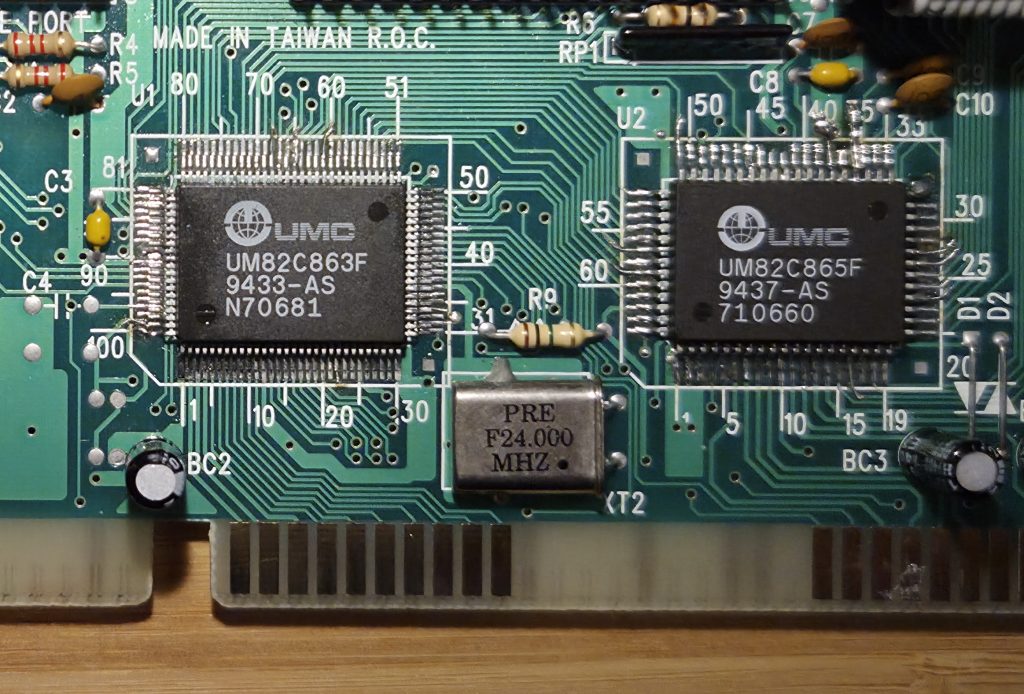
I’ve eventually tried to fix the VLMIO card, as I could source the ICs involved in the I/O communication on ports – UM82C865F [3] and UM82C863F [4]. Although, this time I simply failed. While unsoldering (I don’t have a hot gun equipped station) the SMD parts, several tracks have gone missing, and I had to try and fix them. This time, with bad results. In the end, the board was unusable. Sadly. Maybe this will be part of some salvaging in the future. Or maybe I’ll just throw it away. I’m willing to give it for free to anyone up to the challenge.
The fix
“Bless the maker!” (Star Wars, not Dune this time) I found a Spanish guy on Wallapop selling a (more stable) Goldstar GM82C711 based VLB I/O card, which is now in the PC, and working just fine.
Note: between one and the other interventions more than a years’ time passed 🙂
GPU – wait, GPU…? Are you sure?
The PC came with a standard ISA VGA card, nothing fancy. It was Trident VGA which provided little to none performance on anything else than basic DOS games.
Given the chance of 2 (two) available VLB slots, I’ve started to search for some VGA VLB card. NOTE: back then there was no GPU actually. Graphic cards were not onboarded by a separate processing unit, but just simple hardware extensions of the existing buses, which provided dedicated support to video output.
It was obvious any “real” benchmarking VLB VGA would have been far too expensive for my project here, so I’ve ended up with a cheap Trident TGUI9400CXI [5].
More juice (RAM) to the Graphic Card!
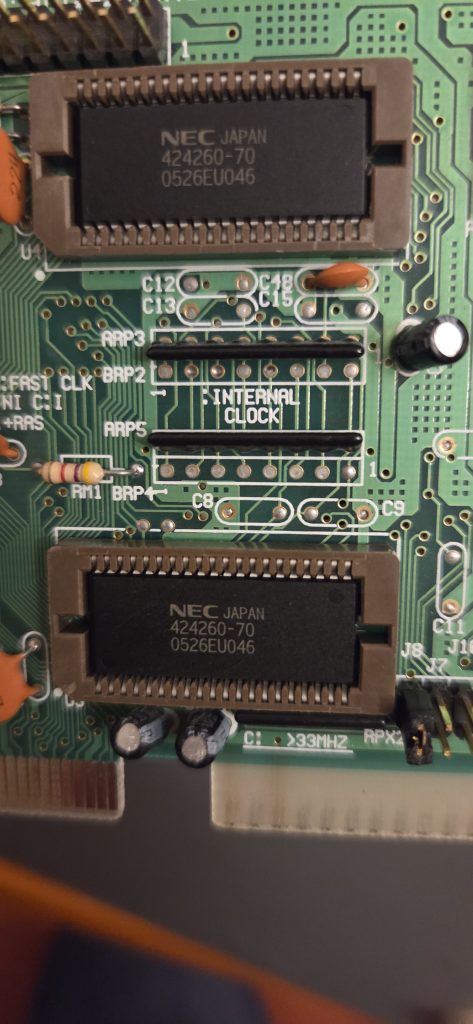
The Trident was equipped with 1MB RAM, with an additional capacity as up as 2MB thanks to some expansion sockets. Which I was very happy to fill in, just for the sake of it – read more at [6].
CPU
Originally, the PC was equipped with the pretty much standard Intel 486DX2 66Mhz. Actually, something more than that, which was the Intel DX2ODPR-66 [7] Overdrive series, which was another one nice discover.
Eventually, I could spot an “untested” DX4ODPR100 CPU – YES, you read it right, an Intel DX4 100 MHz in its Overdrive edition – which turned out to be in pristine condition, and working.
Now, what else? Ah, yes the great missing – a 5.25″ floppy drive
When I was a kid 5.25″ floppies were already obsolete. I’ve started my computing days when 386 were at their ending days, and my first PC was an IBM Model 55 SX which came with just one 3.5″ drive. But I always dreamt of having that massive piece of hardware.
Again, I’ve took the chance of testing myself an “untested” drive, and I was lucky enough it was still working great. This is a Chinon FZ-506 drive.
Conclusion
In all the jobs I’ve been cleaning from dust, put a fan on the CPU for safety/longevity, cleaned all the floppy drives from dust, and heads with IPA. I did likewise with the CD-ROM (writer uh-uh) I’ve equipped on this PC, of course.
It’s also equipped with a gorgeous Realtek RTL 8019AS (NE2000) 10Mbps NIC card, which nicely works out to reach to my internal LAN FTP server – would you believe it?
Still on the Realtek RTL 8019AS (NE2000)
Request: If anyone knows how to let Windows 3.11 for Workgroup to properly shutdown without the RJ45 cable attached, please let me know. I couldn’t find a trick to make the OS aware it shouldn’t really assume a cable is attached, see the post at [8].
Links
[0] https://theretroweb.com/motherboards/s/pcchips-m912-v1.4-486
[1] https://theretroweb.com/expansioncards/s/goldstar-gold-star-prime-2c-mkiii
[2] https://www.vogons.org/viewtopic.php?p=1315648#p1315648
[3] https://ebay.us/m/chsQkS
[4] https://ebay.us/m/wFvfJR
[5] https://theretroweb.com/expansioncards/s/trident-7343l-rev-5
[6] https://www.vogons.org/viewtopic.php?t=103784
[7] https://en.wikipedia.org/wiki/I486_OverDrive
[8] https://www.vogons.org/viewtopic.php?t=103785